
Look, if you’re starting any kind of business in India today, you will hear this one word everywhere — GST.
Don’t get scared. It’s basically a tax registration number you may need to run your business legally. And the good part? You can apply for it from your laptop at home.
Source- Meta ai
So, What Exactly Is a GST Number?
A GST number, officially called GSTIN (Goods and Services Tax Identification Number), is a unique 15-digit identification number given to a registered taxpayer.
Once you have it, you are officially registered under the GST system. Depending on your business, you may need it to issue proper GST invoices, sell through certain e-commerce platforms, and handle your tax compliance.
Do YOU Need GST Registration?
You may need GST registration if:
- Your annual turnover crosses the applicable GST threshold. For many businesses, the commonly applicable threshold is ₹40 lakh for goods and ₹20 lakh for services, although lower limits and different rules apply in some states and situations.
- You make certain interstate supplies.
- You sell goods or services through e-commerce platforms such as Amazon, Flipkart, or Myntra, where GST registration may be required depending on the nature of the supply and applicable rules.
- You simply want to register voluntarily for business or tax-related reasons.
If you’re not sure whether you need GST registration, it’s better to check the latest rules or ask a CA rather than guessing.
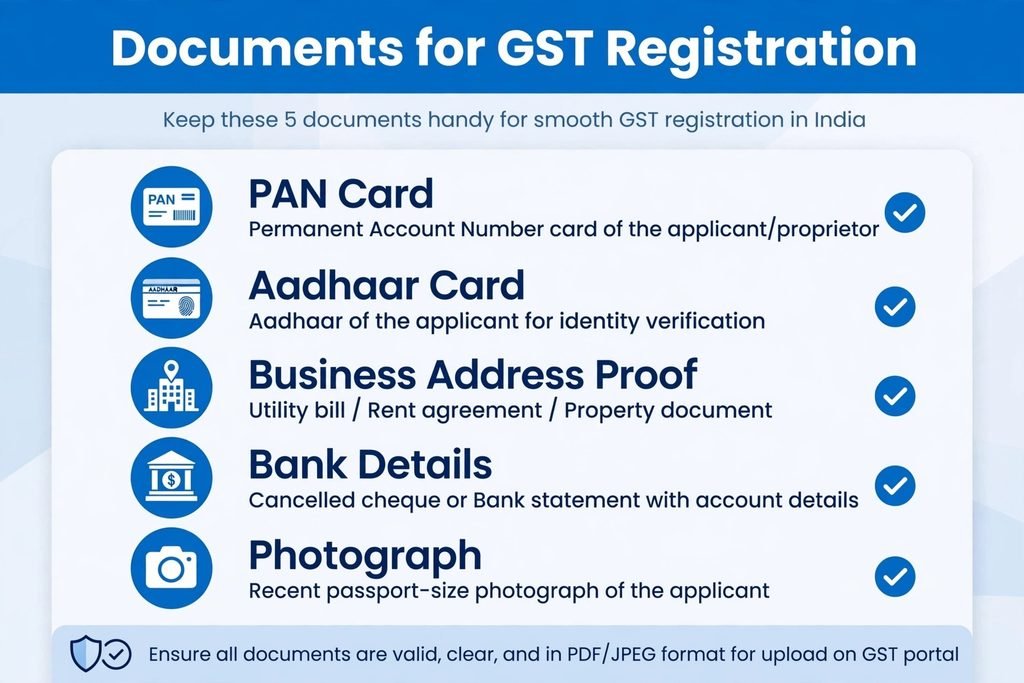
Keep These Documents Ready Before You Start
Trust me, keep this folder ready on your desktop before beginning your new GST application:
- PAN Card
- Aadhaar Card
- Address proof — such as an electricity bill or rent agreement, depending on your circumstances
- Bank account proof, where applicable
- Photograph
- If it’s a partnership or company — relevant partnership, incorporation, or constitution documents
Having these documents ready can make the process much smoother.
How to Apply for GST Registration: Step-by-Step
1. Go to the GST Registration Portal
Visit the official GST registration portal at gst.gov.in.
Go to Services → Registration → New Registration.
Make sure you’re using the official government website rather than a third-party website.
2. Enter Your Basic Details
The portal will ask for details such as your:
- PAN
- Mobile number
- Email address
- State and other basic information
You’ll receive OTPs to verify your mobile number and email address.
3. You Will Get a TRN
After completing the initial stage, you’ll receive a Temporary Reference Number (TRN).
Think of it as a token number for your application. Save it somewhere safe — you’ll need it to return to your application.
4. Fill Out the Main Application Carefully
Now comes the main part.
Log in using your TRN and complete the application with details such as:
- Business name
- Promoter/owner details
- Business address
- Details of goods or services
- Bank account information
- Authorised signatory details, where applicable
This is where people often make mistakes. Take your time while filling out the form. Make sure your PAN and other details are accurate, and upload documents that are clear and readable.
5. Complete Aadhaar Authentication
Depending on your application and the applicable verification process, you may be asked to complete Aadhaar authentication.
Follow the instructions shown on the portal and complete the OTP-based verification if required.
6. Submit the Application
Once you’ve checked everything, submit the application using the verification method applicable to you.
After successful submission, you’ll receive an ARN (Application Reference Number).
Think of your ARN as your application tracking number. Keep it safe.
How Many Days Will GST Registration Take?
The processing time can vary depending on your application and whether the tax authorities need additional information or clarification.
If everything is in order, the process can move ahead smoothly. If something needs clarification, you’ll receive a request from the department.
You can also check your application status through the GST portal using your ARN.
Small Mistakes That Can Delay Your Application
I’ve seen people make these mistakes again and again:
- The name or other details don’t match the PAN records.
- They upload a rent agreement but enter a different business address.
- Documents are blurry or incomplete.
- They don’t respond to a clarification request within the required time.
So, before clicking that final Submit button, take a few minutes to double-check everything.
Do I Have to Pay for GST Registration?
There is no government fee for applying for GST registration through the official GST portal.
However, if you hire a CA, tax consultant, or another professional to handle the application for you, they may charge a separate professional fee.
Got Your GSTIN? What Next?
Getting your GSTIN is only the beginning.
After registration, your business may have ongoing GST responsibilities, such as:
- Issuing GST-compliant invoices
- Maintaining proper records
- Filing applicable GST returns
- Paying GST on time, where applicable
- Following the relevant GST compliance requirements
Depending on your business and registration type, your filing requirements may differ.
Final Thoughts
GST registration might look complicated when you’re seeing the process for the first time, but it becomes much easier once you break it down into simple steps.
Keep your documents ready, use the official GST registration portal, enter your information carefully, and save your TRN and ARN.
And remember — GST rules and thresholds can change. Before submitting a new GST application, check the latest information on the official GST portal or speak to a qualified tax professional if you’re unsure about your situation.
This guide is meant to explain the process in simple language and should not be treated as legal or tax advice.
References
[1] Goods and Services Tax Network (GSTN), “Goods and Services Tax,” Government of India. [Online]. Available: https://www.gst.gov.in/
[2] Goods and Services Tax Council, “Goods and Services Tax (GST),” Government of India. [Online]. Available: https://gstcouncil.gov.in/
[3] Central Board of Indirect Taxes and Customs (CBIC), “Goods and Services Tax,” Department of Revenue, Ministry of Finance, Government of India. [Online]. Available: https://cbic-gst.gov.in/
[4] Government of India, “The Central Goods and Services Tax Act, 2017,” India Code. [Online]. Available: https://www.indiacode.nic.in/