
Imagine this: You have a new app out. It’s brilliant. People love using it. In fact, by day three, thousands of them sign up all at once.
And then, silence.
The servers crash. The database freezes. The beautiful product you created shows a loading wheel. It’s the worst-case scenario for any engineer. This is exactly the issue we worry about in System Design.
You can create an application that works for one user on your laptop. You can also create one that works for ten million people worldwide. It’s essential to focus on scalability from the outset.
But here’s the secret. System design isn’t just for geniuses at Google or Netflix. It’s really about a way of thinking. It’s turning disorder into order. Let’s look at how you can design a system that can grow with you.
1. The Foundation: What is System Design?
System design is similar to software architecture.
If you want to build a doghouse, you can do that with wood and nails. You don’t need blueprints. But if you want to build a skyscraper, you can’t just “figure it out as you go.” You need to know where the plumbing is located, where the elevators should operate, and how to respond in the event of an earthquake.
“The plumbing” relates to data flow in computing. The “elevators” represent networks. “The earthquake” refers to unexpected traffic spikes.
A good system requires compromise. It can’t be perfect in every aspect (fast, cheap, and 100% accurate). It all depends on the problem you are trying to solve.
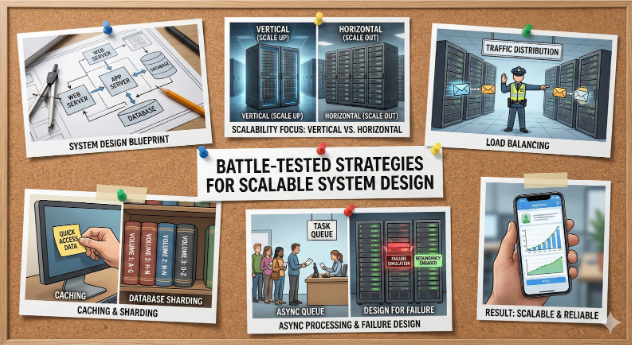
2. Vertical Scaling vs. Horizontal Scaling (A “Pizza Oven” Analogy)
Once your app slows down, you’ll have two choices to fix this, which are basically the options for “Scale-Up vs. Scale-Out.”
Vertical Scaling (Scaling Up):
Imagine running a pizzeria with just one small oven. As more customers arrive, you need to buy a huge industrial oven, which is quite expensive.
In Tech:
You upgrade your server with more memory and a faster processor.
The Catch:
At some point, you hit a limit. There’s no “infinite oven.” If that one oven goes down, your store is out of service.
Horizontal Scaling (Scaling Out):
You don’t need to buy a super-oven. Instead, you buy three more ovens. As demand grows, you add ten more.
In Tech:
You increase the number of servers you have.
The Win:
Scalability is virtually limitless. Even if one machine fails, the others keep working.
Best Practice:
For real focus on scalability, always try to scale horizontally when possible. It’s easier to manage, and it allows for endless scalability.
3. The Traffic Cop: Load Balancing
If you use horizontal scaling with multiple servers, the question becomes: How can a client request reach the server? This is where the Load Balancer comes in.
Think of the load balancer as the receptionist or traffic cop at the entrance of your data center.
- A user request comes in (“I want to see my profile”).
- The Load Balancer checks your pool of servers.
- It sees Server A is busy, while Server B is free.
- The request goes to Server B.
Without this feature, a busy server could crash while others sit idle. An effective load balancer ensures no one server gets overloaded, giving users a smooth experience.
4. The “Cheatsheet” Strategy
Retrieving data can be costly. When a user asks to see the “Most Popular Products,” your database scans millions of records, organizes them, and sends them back. If 1,000 people request this at the same time, your database could fail.
The solution is Caching.
Caching is like your short-term memory or cheat sheet.
Without Cache:
Each time a student (server) wants an answer, they walk to the library (database).
With Cache:
The student writes the answer on a sticky note and keeps it on their desk. When asked again, they just read the note, which is instant.
How to Use it:
Store frequently accessed data (like user profiles or daily news) in a quick storage area such as Redis. Your system should check the cache first before going to the database. This is often the best way to boost the speed of a slow system.
5. Divide and Conquer: Database Sharding
“Databases are usually the hardest thing to scale.” You can easily add more servers, but those servers must communicate with one central location where the actual data resides.
If your app becomes as popular as Facebook, scaling means:
When your database is too big for one computer, use the Sharding technique.
Imagine a world telephone book. It’s too heavy to lift. So, it’s divided into parts: Volume A to F; Volume G to M; and so on.
- Sharding divides your data across many servers using a key like User ID.
- Users 1 to 1,000 reside on Database A.
- Users 1,001 to 2,000 are on Database B.
“This allows you to write to multiple hard drives at once, giving you a huge speed boost. However, it adds complexity because you must remember which ‘volume’ you want to access.” – Brett Blue.
6. Don’t Make Them Wait: Asynchronous Processing
For example, suppose you are building a site that lets users upload pictures. You should:
- Save the picture.
- Resize it for mobile.
- Apply a filter.
- Send a message to their friends.
If you do this one step at a time (synchronously), the user sees a “Loading” screen for ten seconds, and they may leave.
The Solution: Queues (Async)
The response should be, “Got it! We’re working on it,” allowing the user to continue using the app. Meanwhile, the job is added to a Queue (to-do list) and another server processes the task one by one.
This approach gives users the impression of improved performance. They feel the app loads instantly, even if the technical process takes a few seconds longer.
7. The Golden Rule: Design for Failure
This rule distinguishes junior developers from senior architects. A small system assumes nothing will break. A large, scalable system assumes things will break. Hard drives will fail, power will go out, and cables will get cut. Redundancy is essential: always keep more than one copy of your data.
- Never have just one copy of your data.
- Always use more than one server to run your code.
- Don’t rely on just one data center if you’re international.
Take Netflix, for example. They use “Chaos Monkey,” which randomly turns off their servers during the day. This forces their developers to build systems that can self-heal. If one server fails, the system should automatically reroute traffic to another server, preventing any need for late-night troubleshooting.
Conclusion: It’s About the Journey
Mastering system design isn’t about memorizing the CAP theorem or ACID properties. It’s about understanding the user. A “loading” spinner is more than just a graphic; it’s a barrier between the user and what they want. To build scalability trust, use caching, partition your data, and plan for failures. You’re creating something that can withstand any storm, whether from hardware issues or a sudden influx of users.
References
[1] M. Kleppmann, Designing Data-Intensive Applications: The Big Ideas Behind Reliable, Scalable, and Maintainable Systems. Sebastopol, CA, USA: O’Reilly Media, 2017. [Online].
Available: https://dataintensive.net/.
[2] B. Beyer, C. Jones, J. Petoff, and N. R. Murphy, Eds., Site Reliability Engineering: How Google Runs Production Systems. Sebastopol, CA, USA: O’Reilly Media, 2016. [Online].
Available: https://sre.google/sre-book/table-of-contents/.
[3] A. Basiri, N. Behnam, R. de Rooij, L. Hochstein, L. Kosewski, J. Reynolds, and C. Rosenthal, “Chaos Engineering,” IEEE Software, vol. 33, no. 3, pp. 35-41, May-June 2016. [Online].
Available: https://arxiv.org/pdf/1702.05843.
[4] G. DeCandia et al., “Dynamo: Amazon’s highly available key-value store,” in Proc. 21st ACM SIGOPS Symp. Oper. Syst. Princ. (SOSP), Stevenson, WA, USA, 2007, pp. 205–220. [Online].
Available: https://www.allthingsdistributed.com/files/amazon-dynamo-sosp2007.pdf.
[5] G. Hohpe and B. Woolf, Enterprise Integration Patterns: Designing, Building, and Deploying Messaging Solutions. Boston, MA, USA: Addison-Wesley, 2004. [Online].
Available: https://www.enterpriseintegrationpatterns.com.
FAQs
1. What is system design?
System design is the process of defining architecture, components, and data flow to build scalable and reliable applications.
2. Why is scalability important in system design?
Scalability ensures a system can handle increased users or traffic without performance issues or failures.
3. What is horizontal scaling in system design?
Horizontal scaling means adding more servers to distribute workload instead of upgrading a single server.
4. How does load balancing help scalability?
Load balancing distributes incoming traffic across multiple servers to prevent overload and improve availability.
5. What role does caching play in scalable systems?
Caching stores frequently accessed data in fast memory to reduce database load and improve response time.
6. What is database sharding?
Database sharding splits large databases into smaller parts across multiple servers for better performance.
7. What is asynchronous processing?
Asynchronous processing allows time-consuming tasks to run in the background using queues without blocking users.
8. Why should systems be designed for failure?
Failures are inevitable in distributed systems, so redundancy and fault tolerance are essential.
9. Can small applications use system design techniques?
Yes, even small applications benefit from good system design to avoid future scaling issues.
10. Is system design only for big companies like Google or Netflix?
No, system design principles apply to any application that expects growth or user traffic.
Penned by Sanskriti
Edited by Pranjali, Research Analyst
For any feedback mail us at info@eveconsultancy.in
Finance made simple, fast, and fun! 🏦💡 Sign up for your daily dose of financial insights delivered in plain English. In just 5 minutes, you’ll be smarter already!
Simplify Your Business Compliance with Eve Consultancy
Eve Consultancy is your trusted partner for end-to-end compliance services, including Company Incorporation, GST Registration, Income Tax Filing, MSME Registration, and more. With a quick and hassle-free process, expert guidance, and affordable pricing, we help businesses stay compliant while they focus on growth. Backed by experienced professionals, we ensure smooth handling of all your legal and financial requirements. WhatsApp us today at +91 9711469884 to get started.